Five Subquery Traps That Return the Wrong Answer
A subquery looks like a safe way to ask a small question inside a big one. On one 12-row SQLite table I measured five ways it answers a different question than the one you asked: a scalar subquery that silently took the first row, an EXISTS that matched every customer, a LIMIT 1 with no ORDER BY, and a per-row subquery 50 times slower than a join.
 Ibrahim Denis FofanahData Scientist & AI Researcher11 min read·The Practical Data Analyst · Careers
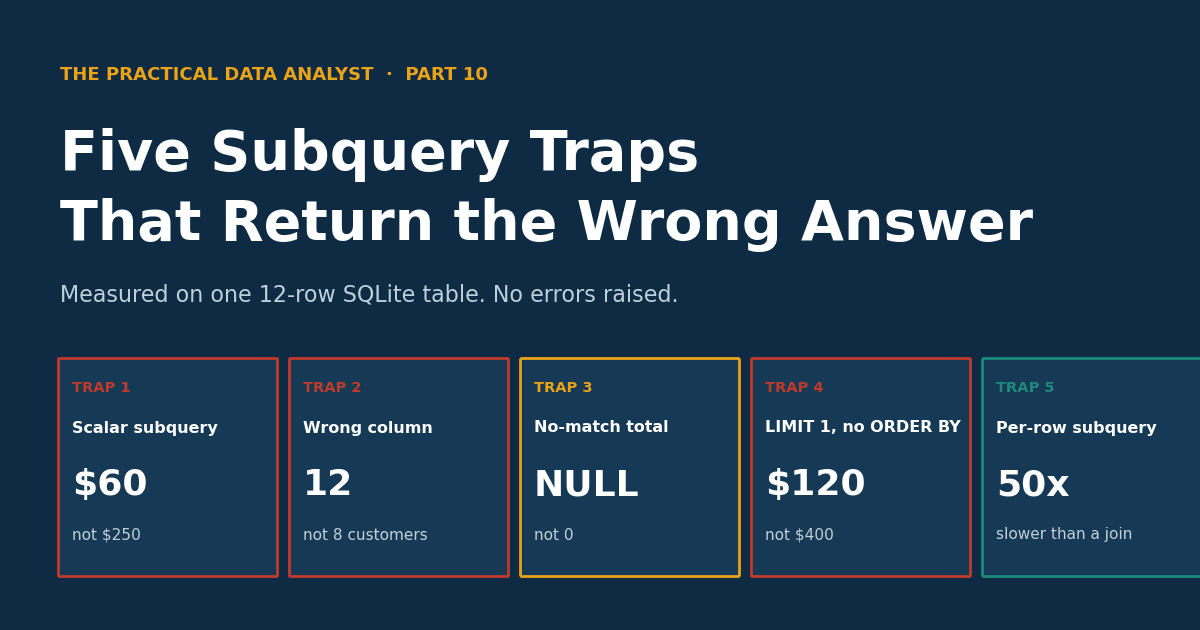
Part 10 of The Practical Data Analyst. Part 1 covered window functions, Part 3 covered JOIN traps, Part 5 covered aggregation traps, Part 8 covered CTE traps, Part 9 covered NULL traps. This one covers subqueries, the construct every analyst reaches for first and debugs last, because the outer query looks fine and the inner query looks fine and the answer is still wrong.
The setup: twelve customers, twelve orders, and the numbers that are actually true
Everything below runs on SQLite 3.45.1, in memory, with two small tables. The data is planted on purpose: four customers have no orders at all, one customer has two orders in the wrong order for the trap that needs them, and the order ids happen to line up with the customer ids, which is exactly what Trap 2 needs.
CREATE TABLE customers (id INTEGER PRIMARY KEY, name TEXT, region TEXT);
CREATE TABLE orders (id INTEGER PRIMARY KEY, customer_id INTEGER,
                     amount REAL, order_date TEXT);
INSERT INTO customers VALUES
 (1,'Amina','Lagos'), (2,'Bola','Kano'), (3,'Chidi','Lagos'),
 (4,'Dara','Abuja'), (5,'Emeka','Kano'), (6,'Fatima','Lagos'),
 (7,'Gbenga','Abuja'), (8,'Hauwa','Kano'), (9,'Ibrahim','Lagos'),
 (10,'Jumoke','Abuja'), (11,'Kemi','Kano'), (12,'Ladi','Lagos');
INSERT INTO orders VALUES
 (1,1,120,'2026-01-05'), (2,1,400,'2026-03-02'), (3,2,90,'2026-01-12'),
 (4,3,60,'2026-02-01'), (5,3,250,'2026-02-20'), (6,4,180,'2026-01-25'),
 (7,5,320,'2026-03-10'), (8,6,75,'2026-02-14'), (9,7,210,'2026-03-15'),
 (10,8,95,'2026-01-30'), (11,2,150,'2026-03-20'), (12,4,55,'2026-03-22');
Ground truth, verified before any trap ran: 12 orders, $2,005 total. Eight of the twelve customers have orders; Ibrahim, Jumoke, Kemi and Ladi have none. Keep those three numbers in mind: 12, $2,005, and 8. Every trap below is a query that returns something else while looking correct.
Trap 1: a scalar subquery that returned two rows, and SQLite said nothing
A scalar subquery is a subquery used where a single value is expected, in the SELECT list or after =. The rule every textbook states is that it must return exactly one row and one column. Chidi has two orders, $60 on February 1 and $250 on February 20. Ask for "Chidi's order amount" with a scalar subquery:
SELECT (SELECT amount FROM orders WHERE customer_id = 3);PostgreSQL would stop you here with an error: more than one row returned by a subquery used as an expression. SQLite does not. It silently returns the first row it finds, $60, and discards the $250. No error, no warning, and the result looks like a perfectly ordinary number. Which row is "first" depends on the order the engine reads them, so the same query can return a different row after a rebuild or on another database. The trap is not that the answer is $60. The trap is that $60 is a real order amount, so nothing in the output tells you a second order existed.
The fix depends on what you actually wanted. If you wanted one summary number, aggregate inside the subquery so it can only ever return one row:
SELECT (SELECT MAX(amount) FROM orders WHERE customer_id = 3);
-- 250
If you wanted one specific row, say which one with ORDER BY and LIMIT 1, and never write LIMIT 1 without the ORDER BY. That is Trap 4, below, and the two traps are the same mistake wearing different clothes: asking for one row without saying which one.
Trap 2: EXISTS matched all twelve customers because of one wrong column
EXISTS asks a yes or no question: does at least one row satisfy the subquery? The question here is which customers have ever ordered. The correct version joins the subquery to the outer row on the foreign key:
SELECT COUNT(*) FROM customers
WHERE EXISTS (SELECT 1 FROM orders WHERE customer_id = customers.id);
-- 8
Eight, matching the ground truth. Now change one column name. The orders table has its own id column, the order number, and a careless edit compares that to the customer id instead of the foreign key:
SELECT COUNT(*) FROM customers
WHERE EXISTS (SELECT 1 FROM orders WHERE id = customers.id);
-- 12
Twelve. Every customer "has an order", including the four who never ordered. The query is valid SQL. Both columns exist, both are integers, and the comparison runs without complaint. It answers a different question than the one you asked: it checks whether an order exists whose order number equals the customer number, and since order ids run 1 to 12 and customer ids run 1 to 12, that is true for everyone. This is the subquery version of the unqualified-column bug, and it is nastier than a typo in a JOIN, because a wrong JOIN usually changes the row count in a way you notice. Here the count went from 8 to 12, and 12 is also the number of customers, so the wrong answer looks like a complete answer.
The fix is boring and it is the whole fix: qualify every column inside a correlated subquery with its table alias, and read the WHERE clause of the subquery as a sentence. WHERE customer_id = customers.id reads as "this order belongs to this customer". WHERE id = customers.id reads as "this order number equals this customer number", which is not a sentence anyone would write on purpose.
Trap 3: the per-customer total that came back NULL for four customers
A scalar subquery in the SELECT list is a tempting way to add a per-customer total without writing a JOIN:
SELECT name,
       (SELECT SUM(amount) FROM orders WHERE customer_id = customers.id) AS total
FROM customers ORDER BY id;| name | total |
|---|---|
| Amina | 520 |
| Bola | 240 |
| Chidi | 310 |
| Dara | 235 |
| Emeka | 320 |
| Fatima | 75 |
| Gbenga | 210 |
| Hauwa | 95 |
| Ibrahim | NULL |
| Jumoke | NULL |
| Kemi | NULL |
| Ladi | NULL |
The eight customers with orders are correct, and the four without orders get NULL, because SUM over zero rows is NULL. That is correct SQL and a wrong report, because a downstream SUM(total) or a dashboard that treats NULL as zero will silently drop those customers from the total, and a filter like WHERE total > 100 will drop them too, since NULL is never greater than 100. Compare with the JOIN version of the same question, which has the opposite failure: an inner JOIN drops the four customers entirely and returns 12 rows, one per order, so a COUNT of customers reads 12 orders instead of 12 customers.
The fix is to say what no orders means. Either wrap the subquery in COALESCE:
SELECT name,
       COALESCE((SELECT SUM(amount) FROM orders
                 WHERE customer_id = customers.id), 0) AS total
FROM customers;
or use a LEFT JOIN with GROUP BY, which keeps all twelve customers and gives the four a zero. Pick one and use it every time. The bug is not choosing the wrong one. The bug is writing the subquery version, seeing NULLs, and deciding they mean zero when the query never said that.
Trap 4: LIMIT 1 picked the earliest order, not the latest
"Latest order per customer" is the most common subquery in reporting, and the most common way to write it is wrong. Amina has two orders: $120 on January 5 and $400 on March 2. The latest is $400. Write the subquery with LIMIT 1 but no ORDER BY:
SELECT (SELECT amount FROM orders WHERE customer_id = 1 LIMIT 1);
-- 120
$120. The earliest order, not the latest. LIMIT 1 without ORDER BY does not mean "the first row in any meaningful order". It means "whichever row the engine reads first", which here is the earliest inserted row, and which can change if the table is rebuilt, vacuumed, or queried on another engine. The query has no error and the number is a real order amount, so again nothing in the output flags it. Add the ORDER BY and the same query returns the right answer:
SELECT (SELECT amount FROM orders WHERE customer_id = 1
        ORDER BY order_date DESC LIMIT 1);
-- 400
This trap is Trap 1 with the error removed. In Trap 1, SQLite silently picked the first of two rows. Here you told it to pick the first of two rows and forgot to say first by what. Every LIMIT 1 in a subquery needs an ORDER BY next to it, and if you catch yourself writing LIMIT 1 to silence a multi-row result, stop: that is Trap 1 again, and you are choosing which wrong row to return instead of fixing the question.
Trap 5: the per-row subquery that ran 50 times slower than the join
The first four traps are about wrong answers. This one is about a right answer that costs fifty times what it should. A correlated subquery in the SELECT list is re-evaluated once per outer row. On twelve customers that is invisible. On real tables it is the whole query. I built a second dataset to measure it: 20,000 orders across 1,000 customers, no index on the foreign key, and the same per-customer total two ways.
-- Correlated scalar subquery, once per customer
SELECT id,
       (SELECT SUM(amount) FROM big_orders
        WHERE customer_id = big_customers.id)
FROM big_customers;

-- The same question as a join
SELECT big_customers.id, SUM(amount)
FROM big_customers
LEFT JOIN big_orders ON big_orders.customer_id = big_customers.id
GROUP BY big_customers.id;| version | time | total |
|---|---|---|
| Correlated subquery | 1.092 s | $5,093,175.63 |
| LEFT JOIN + GROUP BY | 0.022 s | $5,093,175.63 |
Same answer to the cent, 50 times slower. The subquery version scans the 20,000-row orders table once per customer, 1,000 full scans, because with no index there is no faster way to answer it. The join version scans each table once. The honest caveat is that an index on customer_id would close most of this gap, and on twelve rows none of it matters. The point is the scaling law, not the absolute seconds: a correlated subquery is a loop over the outer table, and its cost grows with outer rows times inner rows, while the join grows with their sum. If a dashboard query with a subquery in the SELECT list is slow, this is the first place to look, and the fix is usually to move the aggregation into a derived table or a JOIN, not to add hardware.
The verdict
Subqueries are not bad SQL. Three of these five traps are mistakes in how the subquery is written, not in using one at all, and EXISTS plus a scalar aggregate are the right tools for their questions. But subqueries fail quietly in ways JOINs usually do not: they return the first row instead of erroring, they match on the wrong column and still return a plausible count, they turn missing customers into NULLs, and they re-run once per row without telling you. The pattern across all five traps is the same. The query ran, the number looked real, and the only defence was knowing the ground truth before you ran it.
Before you trust a subquery result, check three numbers: the row count against the table, the total against a plain aggregate, and the NULL count against the customers who should have none. On this table those checks are 12 orders, $2,005, and 8 customers with orders. If any of them is off, the subquery is answering a different question than the one you asked, and the fix is in the inner query, not the outer one.
Key takeaways
- SQLite silently returns the first row when a scalar subquery returns several. PostgreSQL errors. Never rely on the error to catch it; aggregate inside the subquery or say which row you want.
- Qualify every column in a correlated subquery with its table alias. One wrong column turned 8 customers with orders into 12, and the wrong answer looked complete.
- A scalar subquery returns NULL when there is no match. Decide what no orders means, with COALESCE or a LEFT JOIN, instead of letting NULL mean zero by accident.
- LIMIT 1 without ORDER BY picks whichever row the engine reads first. Pair every LIMIT 1 with an ORDER BY, or the "latest" order in your report is whichever row happened to be first.
- A correlated subquery runs once per outer row. On 20,000 orders and 1,000 customers it took 1.092 seconds against 0.022 for the join, 50 times slower, for the same $5,093,175.63 total. An index helps; a JOIN is the fix.
Which of these five have you shipped to production? The silent first row is mine, more than once, and it only ever surfaced when someone counted.
Related on Everyday Data Science: Five JOIN Traps That Quietly Rewrite Your Numbers. One Orders Table Reported $620, $1,240 and $2,040. · Five CTE Traps That Return the Wrong Answer Quietly · Five NULL Traps That Quietly Delete Your Rows
Sources: SQLite Expressions: subqueries · SQLite SELECT: LIMIT and ORDER BY · Why SQLite silently takes the first row from a multi-row scalar subquery · Fixing "more than one row returned by a subquery"
Five NULL Traps That Quietly Delete Your Rows
Next →Five JOIN Traps That Quietly Rewrite Your Numbers. One Orders Table Reported $620, $1,240 and $2,040.
About the writer
Data Scientist & AI Researcher
Data scientist and AI researcher at Pace University. I coined Artificial Frictional Unemployment, and built the first machine learning model for crop yield prediction in Sierra Leone. Author of Understanding Agentic AI. I write about agentic systems and applied ML, with a bias toward what actually works, and who gets left out when it doesn't.
Found this useful? Passing it on to someone who builds is the best way to help the publication grow.
Built something worth sharing? Write it up for us →