Five NULL Traps That Quietly Delete Your Rows
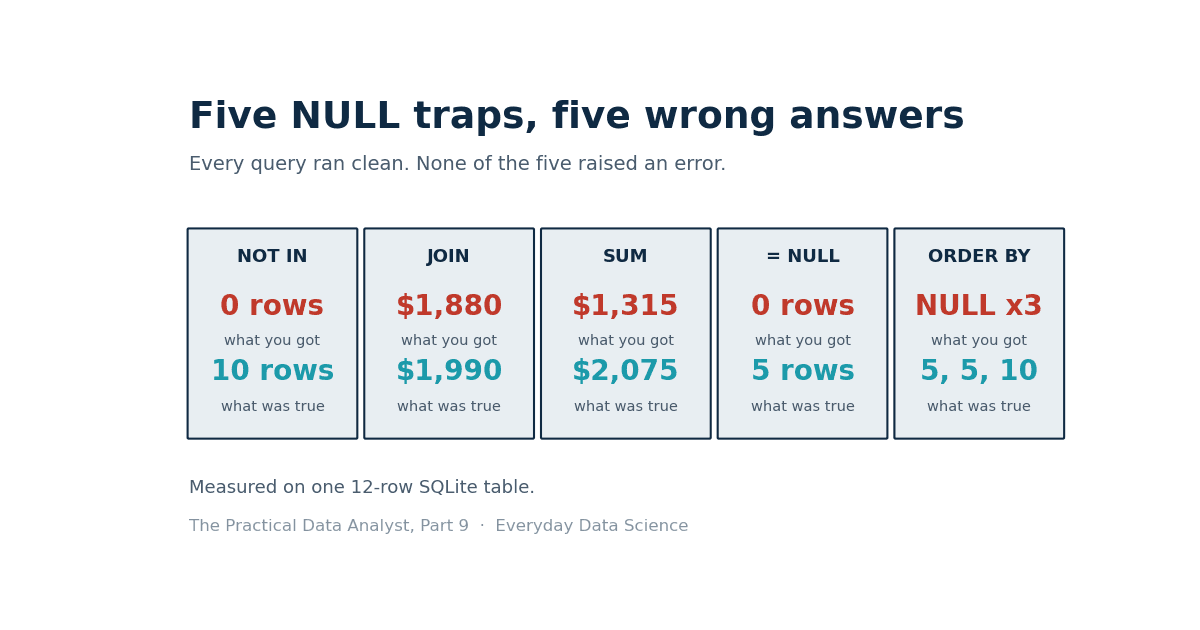
NULL is not a value. It is a missing answer, and SQL treats it that way in every clause that matters. Five traps, each measured on one 12-row SQLite table: a NOT IN that returned zero rows, a JOIN that dropped $110, an addition that lost $760, and two more that look correct until you count.
 Ibrahim Denis FofanahData Scientist & AI Researcher11 min read·The Practical Data Analyst · Careers
Part 9 of The Practical Data Analyst. Part 1 covered window functions, Part 3 covered JOIN traps, Part 5 covered aggregation traps, Part 8 covered CTE traps. This one covers NULL, the value that is not a value. Every analyst meets it on day one and keeps tripping over it for years, because the rules are simple, consistent, and nothing like the rules in Python or a spreadsheet.
The setup: twelve customers, and the numbers that are actually true
Everything below runs on SQLite 3.45.1, in memory, with one small table. The NULLs are planted on purpose: one customer has no city, one has no region, three have no email, five have no discount code, five have no bonus.
CREATE TABLE customers (id INTEGER PRIMARY KEY, name TEXT, city TEXT,
                        region TEXT, email TEXT, discount_code TEXT,
                        spend REAL, bonus REAL);
INSERT INTO customers VALUES
 (1,'A','Lagos','West','a@x.com','DISC10',400,10),
 (2,'B','Kano','North',NULL,'DISC20',300,NULL),
 (3,'C','Lagos','West','c@x.com',NULL,240,20),
 (4,'D','Abuja','North','d@x.com','DISC10',200,NULL),
 (5,'E','Ibadan','West',NULL,NULL,190,5),
 (6,'F','Kano','North','f@x.com','DISC10',150,15),
 (7,'G','Accra','West','g@x.com','DISC20',120,NULL),
 (8,'H','Lagos',NULL,'h@x.com',NULL,110,10),
 (9,'I','Kano','North','i@x.com',NULL,90,NULL),
 (10,'J','Dakar','West','j@x.com','DISC10',80,5),
 (11,'K',NULL,'North','k@x.com','DISC20',60,20),
 (12,'L','Lagos','West',NULL,NULL,50,NULL);
Ground truth, verified before any trap ran: 12 rows, $1,990 total spend. Keep those two numbers in mind. Every trap below is a query that returns something else while looking correct.
One more ground-truth check, because it matters for Trap 3. COUNT(*) says 12. COUNT(email) says 9, because three emails are NULL and COUNT of a column skips NULLs. SUM(bonus) is $85 across the 7 rows that have one, so AVG(bonus) is $12.14, the average of 7 rows. Divide that same $85 by 12 rows and you get $7.08. Both numbers are correct answers to different questions, and the query text does not tell you which one you asked.
Trap 1: NOT IN returned zero rows out of twelve
A blocklist holds three names. Two are real customers, B and E. The third entry is a NULL, left there by a bad import. The question: which customers are not on the blocklist?
CREATE TABLE blocked (name TEXT);
INSERT INTO blocked VALUES ('B'), ('E'), (NULL);

SELECT COUNT(*) FROM customers
WHERE name NOT IN (SELECT name FROM blocked);
Result: 0 rows. Not 10. Zero. Every customer vanished, including the ten who are plainly not blocked.
The reason is three-valued logic. name NOT IN (list) is true only when the name differs from every item in the list. For each customer, the comparison against the NULL entry is neither true nor false. It is UNKNOWN, and UNKNOWN is not TRUE, so WHERE drops the row. One NULL in the list poisons the whole predicate. The trap is that the list looks like three names and behaves like a veto on the entire query.
Two fixes, both measured at 10 rows:
SELECT COUNT(*) FROM customers
WHERE name NOT IN (SELECT name FROM blocked WHERE name IS NOT NULL);

SELECT COUNT(*) FROM customers cu
WHERE NOT EXISTS (SELECT 1 FROM blocked b WHERE b.name = cu.name);
The first fix filters the NULL out of the list. The second avoids the problem entirely, because NOT EXISTS tests for a matching row instead of comparing against a list, and a NULL name never matches anything. Prefer NOT EXISTS when the list comes from a table you do not control, because you cannot see the NULL coming.
Trap 2: the JOIN dropped a customer and $110
A regions table maps each region to a manager: West to Mariam, North to Chidi, South to Ada. Customer H has no region. Join the two tables and count the spend.
SELECT COUNT(*), SUM(spend) FROM customers
JOIN regions USING (region);
Result: 11 rows, $1,880. The real total is 12 rows and $1,990. Customer H and her $110 are gone, and the query ran without complaint.
The inner JOIN keeps only rows with a match on both sides. NULL never matches anything, not even another NULL, so the row with no region has no partner and is dropped. This is the same rule as Trap 1 wearing different clothes: NULL equals nothing, including itself.
The fix is a LEFT JOIN, which keeps every row on the left and fills the missing side with NULL:
SELECT COUNT(*), SUM(spend) FROM customers
LEFT JOIN regions USING (region);
Result: 12 rows, $1,990. Customer H is back, with a NULL manager.
One honest contrast, measured on the same table. GROUP BY region does not drop H. It puts her in her own group: NULL, 1 row, $110, next to North at 5 rows and $800 and West at 6 rows and $1,080. The three groups sum to $1,990. GROUP BY treats NULL as a group of its own. JOIN treats it as a row with no partner. Same value, two rules, and the difference is which clause you are in.
Trap 3: one addition lost $760
The question: total spend plus total bonus. There are two ways to write it, and they disagree by $760.
SELECT SUM(spend + bonus) FROM customers;Result: $1,315.
SELECT SUM(spend) + SUM(bonus) FROM customers;Result: $2,075. The gap is $760, about 38% of the true total.
The first query adds spend and bonus row by row, then sums. Any arithmetic with NULL gives NULL, so for the five rows with no bonus, spend + bonus is NULL, and SUM skips NULLs. Those five rows contribute nothing, not even their spend. Their spend is $300, $200, $120, $90 and $50, which adds up to exactly $760. The gap is not a rounding error. It is five customers erased by a plus sign.
The second query sums each column separately, so the NULLs only shrink the bonus side. SUM(bonus) is $85 over 7 rows, SUM(spend) is $1,990 over 12 rows, and the total is $2,075.
The fix, if you want the per-row addition, is to say what a missing bonus means before you add:
SELECT SUM(spend + COALESCE(bonus, 0)) FROM customers;Result: $2,075. COALESCE turns the missing bonus into a zero, which is a business decision stated in the query, not a default the engine picked for you. If a missing bonus should mean zero, write zero. If it should mean the row is excluded, write that too. The trap is letting NULL decide for you, because its decision is always to disappear.
Trap 4: the comparison that can never be true
Five customers have no discount code. The question: how many? The natural first attempt is wrong in a way that looks like a data problem.
SELECT COUNT(*) FROM customers WHERE discount_code = NULL;Result: 0 rows. The table plainly has five rows with no code, and the query says none.
The comparison = NULL is never true, because NULL is not a value to equal. It evaluates to UNKNOWN for every row, and WHERE keeps only TRUE. The correct test is IS NULL, which was built for exactly this:
SELECT COUNT(*) FROM customers WHERE discount_code IS NULL;Result: 5 rows.
The same rule bites in the negative direction, and this one is easier to miss. "Not DISC10" should be everyone except the four DISC10 customers, which is 8 rows: three with DISC20 and five with no code at all.
SELECT COUNT(*) FROM customers WHERE NOT (discount_code = 'DISC10');Result: 3 rows. Only the DISC20 customers came back. The five NULL rows are neither equal to DISC10 nor not equal to it, so the negation drops them too. A row with a missing value is not "not DISC10". It is unknown, and unknown fails the filter.
The fix spells out both cases:
SELECT COUNT(*) FROM customers
WHERE discount_code IS NULL OR discount_code <> 'DISC10';
Result: 8 rows.
The same logic shows up in CASE. CASE WHEN discount_code = 'DISC10' THEN 1 ELSE 0 END sends the five NULL rows to ELSE, because the WHEN test is UNKNOWN rather than true. I measured it: 8 rows land in ELSE, three DISC20 and five NULL. If your ELSE branch means "everything else", remember that it also catches every row whose value you never saw. PostgreSQL and standard SQL offer IS DISTINCT FROM, a comparison that treats NULL as a value you can compare, so discount_code IS DISTINCT FROM 'DISC10' returns all 8 rows in one test. SQLite has the same operator, spelled IS NOT, and the SQLite documentation states plainly that IS and IS NOT can never evaluate to NULL.
Trap 5: the three smallest bonuses were all missing
The question: the three smallest bonuses in the table. The smallest real bonuses are $5, $5 and $10.
SELECT name, bonus FROM customers ORDER BY bonus ASC LIMIT 3;Result: B, D, G. All three with a bonus of NULL.
SQLite treats NULL as smaller than any value, so ascending order puts the five NULL rows first and LIMIT takes three of them. The query answered "the three smallest bonuses" with three rows that have no bonus at all. The trap is that LIMIT trusts the sort, and the sort has a rule about NULLs that most people never read.
The fix is to filter before you sort:
SELECT name, bonus FROM customers
WHERE bonus IS NOT NULL ORDER BY bonus ASC LIMIT 3;
Result: E with $5, J with $5, A with $10. One honest detail: A and H both have a $10 bonus, and the third slot went to A because it comes first in the table. With a tie, LIMIT picks by storage order unless you add a tiebreaker, so add one, ORDER BY bonus ASC, id ASC, when the order matters.
Descending order does not save you by accident. ORDER BY bonus DESC LIMIT 3 returned C with $20, K with $20 and F with $15, which is correct here only because SQLite puts NULLs last when sorting descending. PostgreSQL does the opposite by default: its documentation states that NULLs sort as if larger than any non-null value, so NULLS FIRST is the default for DESC order and NULLS LAST otherwise. Same query, same data, different answer, decided by the engine. If the position of NULLs matters to your result, write NULLS FIRST or NULLS LAST in the query and stop relying on the default.
The verdict
All five traps share one shape. NULL is not zero, not an empty string, and not a value you can compare, add, join on, or sort. It is a missing answer, and every clause in SQL has its own rule for what to do with a missing answer. WHERE drops it. JOIN drops it. SUM skips it. ORDER BY ranks it first or last depending on the engine. CASE sends it to ELSE. UNIQUE lets it through twice. None of those rules is a bug. The bug is writing a query that assumes NULL behaves like a value, because the query will run, return a plausible number, and never tell you it dropped rows.
The defence is the same one this series keeps coming back to. Know the ground truth before you run the query, then check the answer against it. Twelve rows and $1,990 caught all five traps in this article. A COUNT(*) next to a COUNT(column), a SUM next to a LEFT JOIN total, and a quick check for NULLs in any column a filter touches will catch most of them in a real table too.
Key takeaways
- NOT IN with a NULL in the list returns nothing. Use NOT EXISTS, or filter the NULL out of the list first.
- An inner JOIN drops every row whose join key is NULL. Use LEFT JOIN when the unmatched rows still count.
- Arithmetic with NULL gives NULL, and SUM skips it. Add with COALESCE when a missing value should mean zero, and say so in the query.
= NULLis never true and NOT (...) drops NULL rows too. Test with IS NULL, and write the missing case into the condition.- ORDER BY ranks NULLs by an engine rule, first ascending in SQLite and first descending in PostgreSQL. Filter NULLs out or state NULLS FIRST or NULLS LAST.
Which of these five has bitten you, and what did it cost before you caught it?
Related on Everyday Data Science: Five CTE Traps That Return the Wrong Answer Quietly · Five String Traps That Rewrite Your Totals. A 12-Row Table Lost $415 Before a Single Clean. · Five Aggregation Traps That Rewrite Your Totals. I Measured Each One on Twelve Rows.
Sources: SQLite NULL handling documentation · SQLite expression documentation · PostgreSQL ORDER BY documentation
Five CTE Traps That Return the Wrong Answer Quietly
Next →Five Aggregation Traps That Rewrite Your Totals. I Measured Each One on Twelve Rows.
About the writer
Data Scientist & AI Researcher
Data scientist and AI researcher at Pace University. I coined Artificial Frictional Unemployment, and built the first machine learning model for crop yield prediction in Sierra Leone. Author of Understanding Agentic AI. I write about agentic systems and applied ML, with a bias toward what actually works, and who gets left out when it doesn't.
Found this useful? Passing it on to someone who builds is the best way to help the publication grow.
Built something worth sharing? Write it up for us →