Five JOIN Traps That Quietly Rewrite Your Numbers. One Orders Table Reported $620, $1,240 and $2,040.
Every query in this tutorial ran without an error, returned a plausible number, and was wrong in a different way. Five traps, demonstrated on a 6-order dataset, with the fix for each.
 Ibrahim Denis FofanahData Scientist & AI Researcher7 min read·The Practical Data Analyst · Careers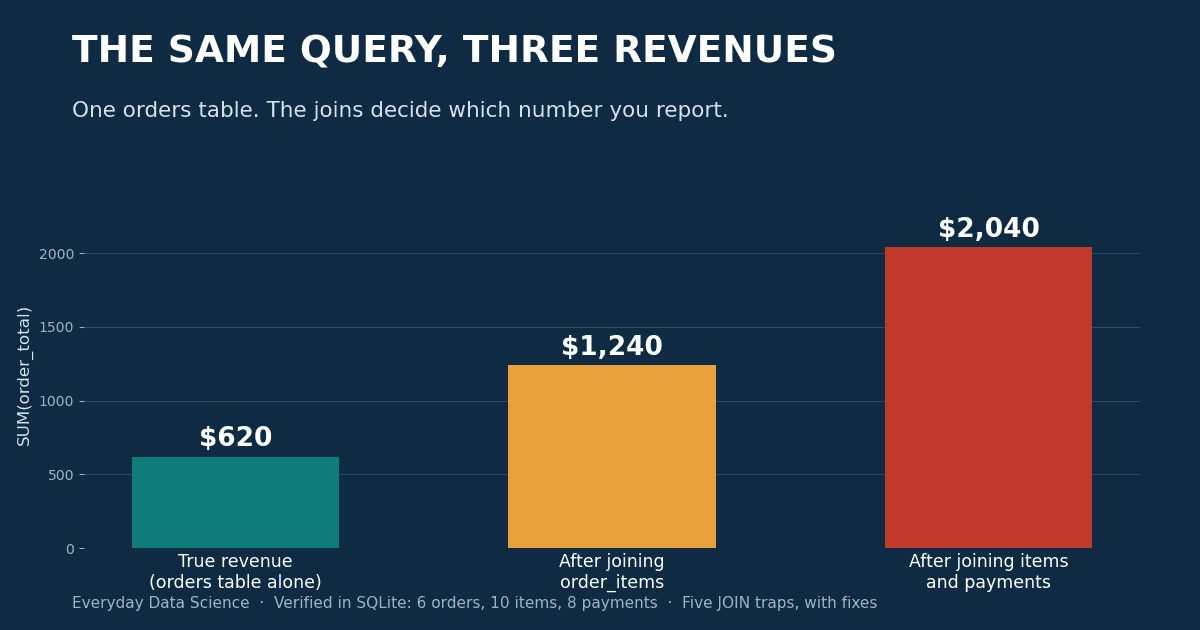
Part 3 of The Practical Data Analyst. Part 1 covered window functions, Part 2 covered the validation checks to run before you query. This one covers what the query itself does to your numbers after the data has passed every check.
The setup: six orders, and the numbers that are actually true
Everything in this tutorial runs on four small tables in SQLite 3.45.1. Five customers, six orders, ten order items, eight payments. One order (106) is a guest checkout, so its customer_id is NULL. Two orders were paid in two instalments, so the payments table has more rows than the orders table.
CREATE TABLE orders(order_id INTEGER, customer_id INTEGER, order_total REAL);
-- 101: cust 1, $100   102: cust 1, $50    103: cust 2, $200
-- 104: cust 3, $80    105: cust 4, $120   106: guest,  $70
CREATE TABLE order_items(order_id INTEGER, sku TEXT);   -- 10 rows
CREATE TABLE payments(order_id INTEGER, seq INTEGER, amount REAL);  -- 8 rows
Before any join, the ground truth is:
| Measure | True value |
|---|---|
| Orders | 6 |
| Revenue (SUM of order_total) | $620 |
| Order items | 10 |
| Payments | 8 |
Keep this table open. Every trap below is a query that disagrees with it while looking completely reasonable.
Trap 1: The one-to-many fan-out
You want revenue and item counts in one report, so you join orders to order_items and aggregate:
SELECT COUNT(*), COUNT(DISTINCT o.order_id), SUM(o.order_total)
FROM orders o
JOIN order_items i ON i.order_id = o.order_id;
Output:
| COUNT(*) | COUNT(DISTINCT order_id) | SUM(order_total) |
|---|---|---|
| 10 | 6 | $1,240 |
The join repeats each order once per item. Order 101 has two items, so its $100 is summed twice. Order 103 has three items, so its $200 is summed three times. COUNT(*) counts joined rows, not orders, and SUM happily adds the duplicated totals. Revenue is exactly double the truth, and nothing in the output looks suspicious.
The fix depends on what you actually need. COUNT(DISTINCT order_id) recovers the order count, but there is no SUM(DISTINCT order_total) trick that survives two orders with the same total. The reliable fix is to aggregate the child table first (Trap 2 shows the full pattern) or keep the revenue query at the orders grain and run a separate item query.
Trap 2: Two child tables multiply each other
Now add payments to the same query, because the report also needs payment counts:
SELECT COUNT(*), SUM(o.order_total)
FROM orders o
JOIN order_items i ON i.order_id = o.order_id
JOIN payments p ON p.order_id = o.order_id;
Output:
| COUNT(*) | SUM(order_total) |
|---|---|
| 15 | $2,040 |
Fifteen rows from six orders. Each order now appears once per item-payment combination. Order 103 has 3 items and 2 payments, so it appears 6 times and contributes $1,200 of the $2,040. Two one-to-many joins from the same parent do not add their row counts. They multiply them.
Trap 3: A WHERE clause turns your LEFT JOIN into an inner join
You want every customer listed, with their big orders where they have them:
SELECT COUNT(*), COUNT(DISTINCT c.customer_id)
FROM customers c
LEFT JOIN orders o ON o.customer_id = c.customer_id
WHERE o.order_total >= 100;
Output:
| COUNT(*) | Customers |
|---|---|
| 3 | 3 |
Without the WHERE clause, the same LEFT JOIN returns 6 rows covering all 5 customers, including Noah Petit, who has no orders. With the filter in WHERE, Noah is gone, and so is Chen Wei, whose only order is $80. The filter runs after the join, and a customer with no matching order has NULL in order_total, and NULL >= 100 is not true, so the row is discarded. The LEFT JOIN preserved them; the WHERE clause deleted them.
The PostgreSQL documentation makes the same point with its own example: a restriction in the ON clause is processed before the join, a restriction in WHERE is processed after it, and with outer joins that difference decides which rows survive. Move the condition into the ON clause and all 5 customers come back (5 rows: one per customer, with order data only where a big order exists):
LEFT JOIN orders o
  ON o.customer_id = c.customer_id AND o.order_total >= 100
Trap 4: Duplicate keys in the table you join to
The first three traps are about the tables you start from. This one is about the table you trust. A customers_dim lookup table has customer 2 in it twice, once with region "East" and once with a stale "East duplicate" row:
SELECT COUNT(*), SUM(o.order_total)
FROM orders o
JOIN customers_dim d ON d.customer_id = o.customer_id;
Output:
| COUNT(*) | SUM(order_total) |
|---|---|
| 6 | $750 |
This is the trap most likely to survive a review, because the row count looks right: 6 rows, matching the 6 orders. The count is a coincidence. Order 103 ($200) matched both dimension rows and was counted twice, adding a phantom $200, while the guest order matched nothing and dropped out, hiding part of the error. Net effect: revenue overstated by $130 with a clean-looking row count.
The guard is a uniqueness check on every key you join to, run before you trust the join:
SELECT customer_id, COUNT(*) AS n
FROM customers_dim
GROUP BY customer_id
HAVING n > 1;
-- returns customer 2, n = 2
If that query returns anything, the join that follows it is not safe yet.
Trap 5: NULL keys vanish in an inner join
Order 106 is a guest checkout. Its customer_id is NULL, and NULL never equals anything, including another NULL. So the standard revenue-by-customer query silently excludes it:
SELECT COUNT(*), SUM(o.order_total)
FROM orders o
JOIN customers c ON c.customer_id = o.customer_id;
Output:
| COUNT(*) | SUM(order_total) |
|---|---|
| 5 | $550 |
That is $70 missing, 11.3% of true revenue, with no error and no NULL row in the output to hint at the loss. The same query as a LEFT JOIN from orders returns all 6 orders and the full $620, with the guest order carrying a NULL customer name where it belongs: visible, countable, and explainable in the report.
The safe pattern: aggregate to the grain, then join
Every fix above is one idea applied five times: a join is safe when both sides are at the same grain, one row per key. So collapse each child table to one row per order first, then join:
WITH item_agg AS (
  SELECT order_id, COUNT(*) AS items
  FROM order_items GROUP BY order_id
),
pay_agg AS (
  SELECT order_id, COUNT(*) AS pays, SUM(amount) AS paid
  FROM payments GROUP BY order_id
)
SELECT COUNT(*), SUM(o.order_total), SUM(ia.items), SUM(pa.pays)
FROM orders o
LEFT JOIN item_agg ia ON ia.order_id = o.order_id
LEFT JOIN pay_agg pa ON pa.order_id = o.order_id;
Output, checked against the ground-truth table at the top:
| Orders | Revenue | Items | Payments |
|---|---|---|---|
| 6 | $620 | 10 | 8 |
All four numbers true in one query. The pre-aggregation costs a few lines and removes the entire class of error, instead of asking you to spot it in the output.
The verdict:
Joins do not corrupt data. They change what a row means, and every aggregate downstream believes the new meaning. The five traps here produced errors of +100%, +229%, missing customers, +21% with a correct-looking row count, and -11%. The dataset had six orders. On six million, the percentages survive and the eyeball check does not.
Key takeaways
- After any join, compare COUNT(*) against COUNT(DISTINCT key). A gap between them is the fan-out, measured.
- Never SUM a parent-table column after joining a child table. Aggregate the child to the parent grain first.
- Two one-to-many joins from the same parent multiply rows. Pre-aggregate each child separately.
- A filter on the right table of a LEFT JOIN belongs in the ON clause if unmatched left rows must survive.
- Check join keys for duplicates on the lookup side and for NULLs on the fact side before you aggregate, not after the numbers look strange.
Which of these five has bitten you, and how did you catch it: a row-count check, a total that failed to reconcile, or a customer asking why their number changed?
Related on Everyday Data Science:
- SQL Window Functions: 5 Patterns That Cover Analytics
- 5 Data Validation Checks Every Analyst Should Run
- I Benchmarked Pandas, Polars, and DuckDB on 3.4M Taxi Rows
Sources: PostgreSQL documentation, Table Expressions (ON vs WHERE in outer joins), SQLite documentation, the SELECT statement. All query outputs in this tutorial were produced by running the queries above in SQLite 3.45.1; the dataset is synthetic and built for this tutorial.
About the writer
Data Scientist & AI Researcher
Data scientist and AI researcher at Pace University. I coined Artificial Frictional Unemployment, and built the first machine learning model for crop yield prediction in Sierra Leone. Author of Understanding Agentic AI. I write about agentic systems and applied ML, with a bias toward what actually works, and who gets left out when it doesn't.
Found this useful? Passing it on to someone who builds is the best way to help the publication grow.
Built something worth sharing? Write it up for us →