Five String Traps That Rewrite Your Totals. A 12-Row Table Lost $415 Before a Single Clean.
Every query in this tutorial ran without an error and returned a plausible number. Five string traps, each measured on the same 12-row customer table, with the fix for each.
 Ibrahim Denis FofanahData Scientist & AI Researcher8 min read·The Practical Data Analyst · Careers
A trailing space is invisible in a spreadsheet and fatal in a join. This tutorial measures five string traps on one small table, so you can see the exact size of each error instead of taking it on trust.
The setup is deliberately small. Twelve customers, six real cities, six real people, $1,420 in total spend. Every row is shown below, spaces and capital letters included, because the mess is the point.
| id | name | city | spend | |
|---|---|---|---|---|
| 1 | Amina Bello | amina@example.com | Lagos | 120 |
| 2 | Amina Bello (trailing space) | AMINA@example.com | Lagos (trailing space) | 120 |
| 3 | Chidi Okafor | chidi@example.com | Abuja | 85 |
| 4 | Chidi Okafor | chidi@example.com (trailing space) | abuja | 85 |
| 5 | Fatima Diallo | (empty string) | Dakar | 200 |
| 6 | Fatima Diallo | NULL | Dakar | 200 |
| 7 | Kofi Mensah | kofi@example.com | Accra | 60 |
| 8 | Kofi Mensah | kofi@example.com | ACCRA | 60 |
| 9 | Zainab Yusuf | zainab@example.com | Kano | 150 |
| 10 | Zainab Yusuf | zainab@example.com | Kano (trailing space) | 150 |
| 11 | Tunde Ade | tunde@example.com | Ibadan | 95 |
| 12 | Tunde Ade | tunde@example.com | Ibadan | 95 |
Ground truth: 6 customers, 6 cities, 5 real email addresses, $1,420 total spend. The second table is a city lookup with one row per city and its population in millions.
CREATE TABLE customers (id INTEGER, name TEXT, email TEXT, city TEXT, spend REAL);
CREATE TABLE city_pop (city TEXT PRIMARY KEY, pop_m INTEGER);
-- city_pop: Lagos 15, Abuja 4, Dakar 1, Accra 2, Kano 4, Ibadan 3
All queries ran in SQLite 3.45.1. SQLite compares text with a case-sensitive binary collation by default, so 'Lagos' and 'lagos' are different values, and 'Lagos ' with a trailing space is a third value. Other databases differ in detail (PostgreSQL, for example, treats LIKE as case-sensitive), but the traps below exist in every SQL dialect in some form.
Trap 1: the join that quietly drops rows
Joining customers to the city lookup on the raw city column looks correct. It returns rows, it returns a total, and both are wrong.
SELECT COUNT(*), SUM(spend)
FROM customers c
JOIN city_pop p ON c.city = p.city;| query | rows matched | spend joined |
|---|---|---|
| raw city | 8 | $1,005 |
| TRIM(city) only | 10 | $1,275 |
| LOWER(TRIM(city)) | 12 | $1,420 |
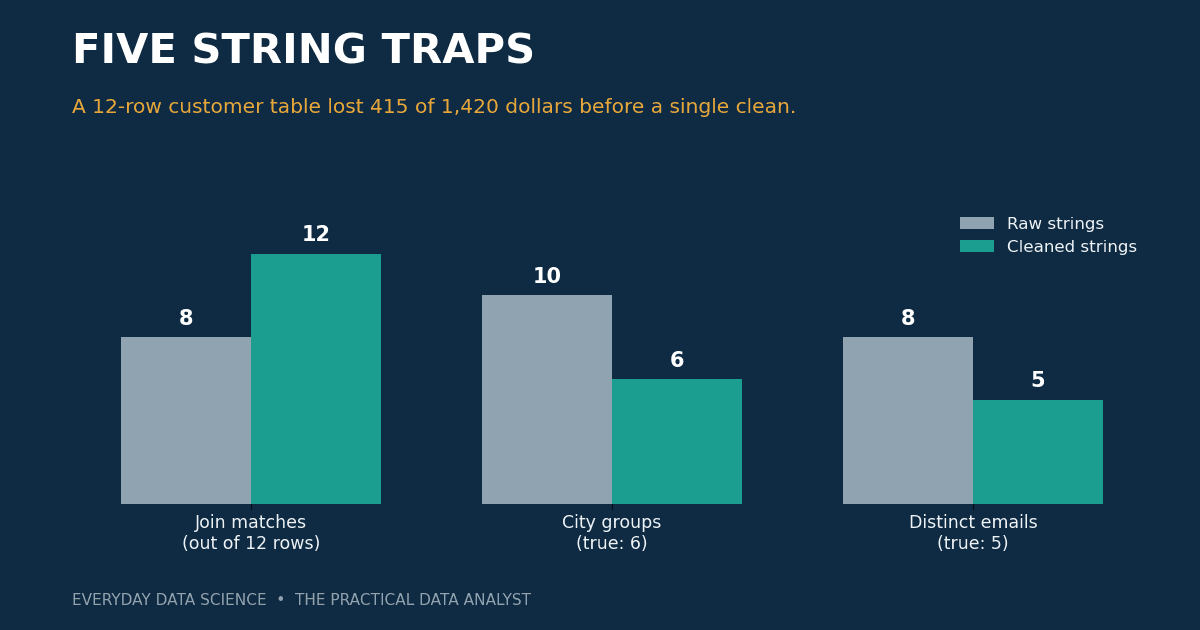
Four rows fail to match on the raw join: 'Lagos ', 'abuja', 'ACCRA', and 'Kano '. That is $415 of $1,420, or 29% of the spend, missing from every downstream report. No error is raised. The query succeeds and the dashboard shows $1,005 with a straight face.
Note what a partial fix buys. TRIM alone recovers the two trailing-space rows and reaches 10 of 12, which makes it the most dangerous kind of fix: good enough to look finished. Only normalising case as well recovers all 12 rows.
-- the fix: normalise both sides, or use a case-insensitive collation
SELECT COUNT(*)
FROM customers c
JOIN city_pop p ON LOWER(TRIM(c.city)) = LOWER(p.city);
-- 12

SELECT COUNT(*)
FROM customers c
JOIN city_pop p ON TRIM(c.city) = p.city COLLATE NOCASE;
-- 12
Trap 2: GROUP BY invents cities
Grouping spend by the raw city column produces ten groups for six real cities.
SELECT city, COUNT(*), SUM(spend)
FROM customers
GROUP BY city
ORDER BY city;| city | rows | spend |
|---|---|---|
| ACCRA | 1 | $60 |
| Abuja | 1 | $85 |
| Accra | 1 | $60 |
| Dakar | 2 | $400 |
| Ibadan | 2 | $190 |
| Kano | 1 | $150 |
| Kano (trailing space) | 1 | $150 |
| Lagos | 1 | $120 |
| Lagos (trailing space) | 1 | $120 |
| abuja | 1 | $85 |
Lagos is split into two $120 rows, Accra into two $60 rows, Abuja into two $85 rows, Kano into two $150 rows. The normalised grouping tells a different story:
| city | rows | spend |
|---|---|---|
| dakar | 2 | $400 |
| kano | 2 | $300 |
| lagos | 2 | $240 |
| ibadan | 2 | $190 |
| abuja | 2 | $170 |
| accra | 2 | $120 |
On the raw grouping, a "top cities" report ranks Dakar first at $400 and Ibadan second at $190, with Lagos nowhere near the top. In truth Lagos is third at $240, behind Kano at $300. The ranking is not slightly off. It is wrong in a way that changes which city a team would prioritise.
Trap 3: an empty string is not a missing value
Fatima Diallo appears twice: once with an empty-string email, once with NULL. They mean the same thing, a customer with no email on file, and SQL treats them differently.
SELECT COUNT(*) AS rows,
       COUNT(email) AS count_email,
       COUNT(NULLIF(email, '')) AS real_emails
FROM customers;| rows | COUNT(email) | COUNT(NULLIF(email, '')) |
|---|---|---|
| 12 | 11 | 10 |
COUNT(column) counts every non-NULL value, and an empty string is a value. So "11 customers have an email address" overstates the reachable list by one, and the one it overstates by is a blank string that will bounce or fail silently in a mail merge. The NULL row is correctly excluded. The empty-string row is the one that slips through.
-- the fix: turn empty strings into NULL at ingest, then COUNT works
SELECT COUNT(NULLIF(TRIM(email), '')) FROM customers;
-- 10
The same trap bites in the other direction. A filter like WHERE email IS NULL finds one of the two missing-email customers and misses the other. If you are hunting for incomplete records, check for both.
Trap 4: DISTINCT counts spellings, not people
How many distinct customers emailed us? The raw answer is 8. The true answer is 5.
SELECT COUNT(DISTINCT email) FROM customers;
-- 8

SELECT COUNT(DISTINCT LOWER(TRIM(email)))
FROM customers
WHERE email IS NOT NULL AND TRIM(email) <> '';
-- 5
The three phantom emails are case and space variants: AMINA@example.com versus amina@example.com, and chidi@example.com with a trailing space versus without. Names show the same pattern on a smaller scale: COUNT(DISTINCT name) returns 7 for 6 real people, because 'Amina Bello ' with a trailing space counts as a seventh person.
This is the trap with the most direct business cost. A deduplication step built on raw emails sends 8 messages to 5 people. Three of them get the same email twice, and the campaign report claims a reach of 8. Both numbers are wrong, and both look precise.
Trap 5: LIKE treats % and _ as instructions, not characters
A product-code table holds five codes: 100%, 1000, 100A, 10_0, and 100. Searching for the literal code 100% with LIKE returns four of the five.
SELECT code FROM codes WHERE code LIKE '100%';
-- 100%, 1000, 100A, 100
The % in the pattern is a wildcard that matches any sequence of characters, including none, so the pattern matches every code starting with 100. The underscore is a wildcard too: LIKE '10_0' matches both 10_0 and 1000, because _ matches any single character, including 0.
SELECT code FROM codes WHERE code LIKE '10_0';
-- 1000, 10_0

SELECT code FROM codes WHERE code = '100%';
-- 100%

SELECT code FROM codes WHERE code LIKE '100\%' ESCAPE '\';
-- 100%
The fix depends on what you meant. If you want an exact code, use =, not LIKE. If you need a pattern that contains a literal % or _, escape it with the ESCAPE clause. And remember that in SQLite, LIKE is case-insensitive for ASCII letters by default, so LIKE 'lagos%' matches 'Lagos', while = does not. The two operators do not even agree on what equality means.
The safe pattern: clean once, at the door
Cleaning inside every query works, but it is a tax you pay forever and a fix you will forget in exactly one query. Clean once, when data enters the table, and store the cleaned value.
WITH clean AS (
  SELECT
    id,
    TRIM(name) AS name,
    NULLIF(LOWER(TRIM(email)), '') AS email,
    LOWER(TRIM(city)) AS city,
    spend
  FROM customers
)
SELECT city, COUNT(*), SUM(spend)
FROM clean
GROUP BY city;
-- 6 groups, $1,420 total, Lagos $240 in third place
Three rules cover the five traps:
- Trim and lower-case text keys at ingest, and do it on both sides of every join.
- Convert empty strings to NULL with NULLIF, so missing means one thing, not two.
- Use
=for exact values and LIKE only for real patterns, with ESCAPE when the pattern can contain%or_.
The verdict
The uncomfortable part of this exercise is how little data it took. Twelve rows, six people, and the raw queries still produced a join that lost 29% of spend, a city ranking that demoted Lagos out of the top three, an email count overstated by one, a deduplication that invented three people, and a search that returned four codes for one. None of the five queries errored. Every one of them returned a number that looked finished.
That is the real lesson. String traps do not announce themselves with errors. They announce themselves months later, when someone notices the Lagos total does not match the finance sheet, or a customer complains about a duplicate email. By then the bad number has been quoted in a meeting and copied into a slide. The cheapest place to catch a dirty string is at the door, before it is stored. The second cheapest is a five-minute check like the ones above: join against a lookup and count the misses, group a column and count the groups, count a column and count the NULLs. If any of those three numbers surprises you, the strings are dirty.
Key takeaways
- A raw text join can silently drop rows. On 12 rows it matched 8 and lost $415 of $1,420. Check join coverage before trusting a joined total.
- GROUP BY splits on invisible differences. Ten groups appeared where 6 exist, and the city ranking changed. Normalise before grouping, not after.
- An empty string is a value, not a missing value. COUNT(email) said 11; only 10 emails were real. Use NULLIF to make missing mean one thing.
- DISTINCT counts spellings, not people. Eight distinct raw emails belonged to 5 people. Deduplicate on cleaned values.
- LIKE treats
%and_as wildcards. Searching for the literal code100%returned 4 of 5 codes. Use=for exact values and ESCAPE for literal wildcards.
Which of these five has bitten you? The join, the group, the count, the dedupe, or the pattern match, and how did you find out?
Related on Everyday Data Science: Five JOIN Traps That Quietly Rewrite Your Numbers. One Orders Table Reported $620, $1,240 and $2,040. · Five Aggregation Traps That Rewrite Your Totals. I Measured Each One on Twelve Rows. · Your Query Is Slow. EXPLAIN Told You Why: Five Plan Checks That Catch It Before Users Do
Sources: SQLite core functions: trim, lower, nullif · SQLite expressions: LIKE, ESCAPE, COLLATE
Most Analytics Bugs Are Data Bugs. Five Checks That Catch Them Before the Meeting.
Next →Five CTE Traps That Return the Wrong Answer Quietly
About the writer
Data Scientist & AI Researcher
Data scientist and AI researcher at Pace University. I coined Artificial Frictional Unemployment, and built the first machine learning model for crop yield prediction in Sierra Leone. Author of Understanding Agentic AI. I write about agentic systems and applied ML, with a bias toward what actually works, and who gets left out when it doesn't.
Found this useful? Passing it on to someone who builds is the best way to help the publication grow.
Built something worth sharing? Write it up for us →