Five Date Traps That Move Money Between Months: I Measured Each One
The Practical Data Analyst, Part 4. A date-only end filter cut a March total from $420 to $170, and four more traps that pass review because the query runs without an error.
 Ibrahim Denis FofanahData Scientist & AI Researcher10 min read·The Practical Data Analyst · Careers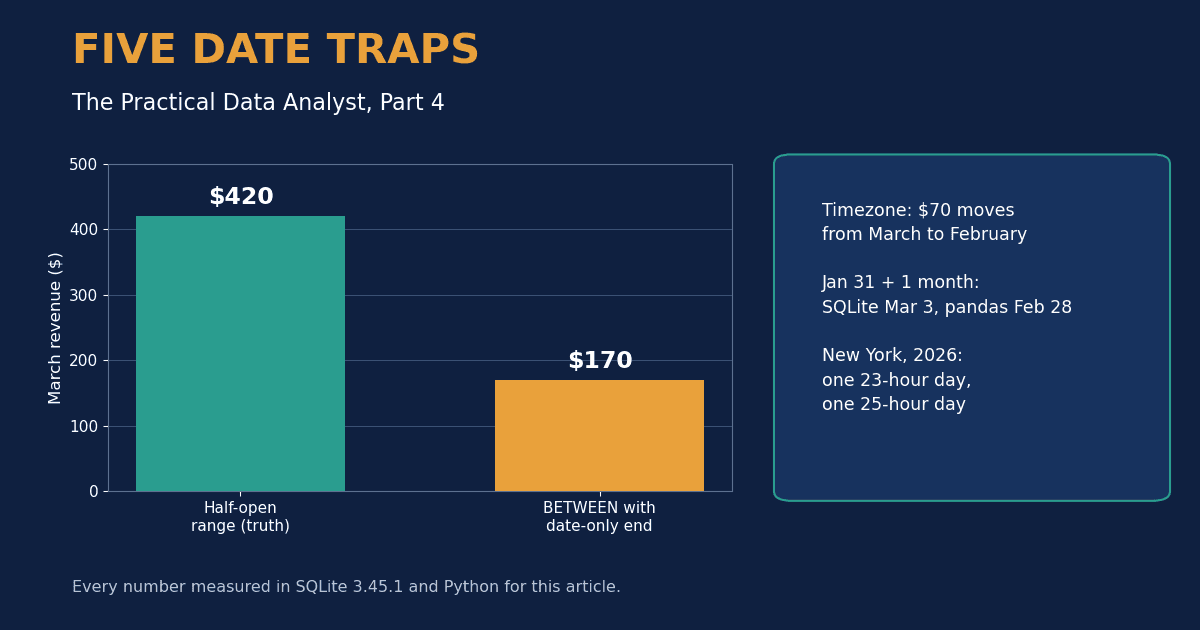
Date columns look like the safest columns in a table. They sort well, they group well, and every database ships a shelf of functions for them. That surface calm hides a problem: a date is three different things wearing one name. It can be a calendar day, a moment in time, or a moment in time as seen from a place. Queries that mix those three meanings run fine and answer a slightly different question from the one the analyst asked.
This is Part 4 of The Practical Data Analyst. Parts 1 to 3 covered window functions, validation checks, and JOIN traps. This part uses one small table and five experiments. Every number below came out of a script I ran for this article, and the dataset is small enough to check by hand.
The setup: five orders, four in March
The table stores timestamps as ISO text, in UTC:
| id | ts (UTC) | amount |
|---|---|---|
| 1 | 2026-03-30 10:00:00 | 100 |
| 2 | 2026-03-31 00:15:00 | 50 |
| 3 | 2026-03-31 14:00:00 | 200 |
| 4 | 2026-04-01 09:00:00 | 80 |
| 5 | 2026-03-01 01:30:00 | 70 |
Ground truth, counted by hand: March holds four orders and $420. April holds one order and $80. Keep those two numbers in mind. Each trap below breaks one of them in a different way.
Trap 1: A date-only end filter deletes the last day
The most common month filter in analyst SQL looks like this:
SELECT COUNT(*), SUM(amount)
FROM orders
WHERE ts BETWEEN '2026-03-01' AND '2026-03-31';
It returned 2 orders and $170. The true March figure is 4 orders and $420. The filter lost $250, or 59.5% of the month, and returned no warning.
The end value is the problem. A date with no time means the start of that day, midnight at 00:00:00. The filter therefore asks for everything up to the first instant of March 31. Both March 31 orders fall after that instant, the one at 00:15 and the one at 14:00, so both are excluded. Order 2 is the painful one: it misses the cutoff by fifteen minutes.
The fix is a half-open range. Name the first day you want and the first day you do not want, and let a strict less-than do the work:
SELECT COUNT(*), SUM(amount)
FROM orders
WHERE ts >= '2026-03-01' AND ts < '2026-04-01';
That returned 4 orders and $420, the hand-counted truth. The same shape works for days, weeks, and quarters, and it never needs to know whether a month has 28, 30, or 31 days.
Trap 2: The timezone decides which month an order belongs to
Order 5 was placed at 2026-03-01 01:30 UTC. Grouped by UTC date, it belongs to March, and $70 of March revenue is this order. Convert the same instant to New York time and the picture changes:
from datetime import datetime, timezone
from zoneinfo import ZoneInfo

ts = datetime(2026, 3, 1, 1, 30, tzinfo=timezone.utc)
print(ts.astimezone(ZoneInfo("America/New_York")))
# 2026-02-28 20:30:00-05:00
In New York the order happened on the evening of February 28. A report grouped by local date puts the $70 in February. A report grouped by UTC date puts it in March. March totals differ by $70, February totals differ by $70, and both reports are internally consistent. Two teams can argue about March revenue with correct queries and different answers, and the disagreement is a timezone setting that neither query mentions.
The rule that prevents the argument: store timestamps in UTC, and agree in writing which timezone owns the reporting day. For a business that operates in one city, that is usually the local date. For a global product, it is usually UTC, stated on the report itself. What you cannot do is let each tool pick its own default. SQLite stores what you give it and assumes nothing, a Python script may convert to the machine's local zone, and a BI tool may use the viewer's zone. The pandas time series guide makes the underlying distinction cleanly: tz_localize labels a naive timestamp with a zone, while tz_convert moves an aware timestamp to a new zone and changes the clock reading. Confusing those two operations is Trap 2 in a single line of code.
Trap 3: Adding a month is engine-specific arithmetic
Subscription cohorts, 30-day windows, and renewal reports all add months to dates. January 31 is where the engines part company:
SELECT date('2026-01-31', '+1 month');  -- SQLite: 2026-03-03
SELECT date('2024-01-31', '+1 month');  -- SQLite: 2024-03-02
SELECT date('2026-03-31', '-1 month');  -- SQLite: 2026-03-03
from datetime import date
from dateutil.relativedelta import relativedelta
print(date(2026, 1, 31) + relativedelta(months=1)) # 2026-02-28
print(date(2024, 1, 31) + relativedelta(months=1)) # 2024-02-29Pandas DateOffset(months=1) agrees with dateutil on both dates. SQLite instead builds the target date first, February 31, a date that does not exist, and then rolls the overflow forward. In a leap year the overflow is two days, landing on March 2. In 2026 the overflow is three days, landing on March 3. The third line is the strangest result in this article: subtracting one month from March 31 returns March 3, so the result sits in the same month it started from.
Neither behaviour is a bug in isolation. Clamping to the last valid day is a defensible rule, and rolling forward is a defensible rule. The trap fires when a pipeline mixes engines: cohorts built in SQLite and analysed in pandas disagree about who belongs in the one-month cohort by up to three days, and January cohorts are always the largest group hitting the boundary. If your month arithmetic crosses a tool boundary, pin the rule down with a test on January 31 before you trust any output.
Trap 4: The ISO week year is not the calendar year
Weekly reporting adds a fourth meaning of date. ISO weeks run Monday to Sunday, week 1 is the week holding the year's first Thursday, and a week is never split between two years. Two consequences follow, both verified with Python's isocalendar():
| Date | Calendar year | ISO year | ISO week |
|---|---|---|---|
| 2025-12-29 | 2025 | 2026 | 1 |
| 2025-12-31 | 2025 | 2026 | 1 |
| 2027-01-01 | 2027 | 2026 | 53 |
| 2026-12-28 | 2026 | 2026 | 53 |
Pair the ISO week number with the calendar year, a pairing spreadsheets and quick SQL both encourage, and you file December 29, 2025 under "2025, week 1", a week that started on December 30, 2024. You file January 1, 2027 under "2027, week 53", a week that does not exist in ISO year 2027. The totals still add up, which is what makes this trap quiet: no week is double-counted, the labels are just wrong, and year-over-year weekly comparisons shift by one week at the boundary.
SQLite adds a related snare. Its strftime('%W', ...) returns a Monday-based week of year from 00 to 53, which is a different numbering from ISO. For 2027-01-01 it returns week 00. Code that reads %W output as an ISO week will mislabel every January boundary it touches. The safe pattern in any tool: store the ISO year next to the ISO week, never the calendar year, and treat the pair as one unit in group-bys and joins.
Trap 5: Two days a year do not have 24 hours
Daily averages quietly assume each day contributes the same span of time. In America/New_York in 2026, two days break that assumption. I measured both by converting local midnights to UTC with zoneinfo:
| Local date | Hours between midnights |
|---|---|
| 2026-03-08 | 23 |
| 2026-03-09 | 24 |
| 2026-11-01 | 25 |
On March 8 the clocks jump from 02:00 to 03:00, so the hour starting 02:00 never happens, and any hourly series for that date has 23 buckets. On November 1 the hour starting 01:00 happens twice, once in daylight time and once in standard time, and a naive timestamp of 01:30 that day is ambiguous: two real moments share one label. Per-hour rates computed across those days move by about 4% for reasons that have nothing to do with behaviour, and a daily job scheduled at 02:30 local time simply never runs on March 8.
The practical defences are small. Compute rates over spans longer than a day near the two transition dates, or compute them in UTC. Keep scheduled jobs away from the 02:00 to 03:00 local window. When you store a local timestamp, store its UTC offset alongside it, because 01:30 alone cannot tell you which 01:30 it was on November 1.
The safe pattern, in one block
Most of this article compresses into four habits:
-- 1. Half-open ranges for every period filter
WHERE ts >= '2026-03-01' AND ts < '2026-04-01'

-- 2. Group by a named, converted date, never a raw default
--    (convert ts to the reporting timezone first, then take its date)

-- 3. Pin month arithmetic to one engine and test it on the 31st

-- 4. Store ISO year with ISO week, and UTC offset with local times
The verdict
None of these five traps produces an error message. The query planner is satisfied, the dashboard renders, and the number that reaches a meeting is wrong by $250 in a $420 month, by $70 across a month boundary, by three days in a cohort, by one week in a year label, or by one hour in a day. Date bugs are accounting bugs with better camouflage. The common defence is cheap: pick the tiny-dataset habit from this series and hand-check one boundary month, one month-end date, one New Year week, and one daylight saving day before a query ships.
Key takeaways
- Use half-open ranges,
>=the first day you want and<the first day you do not, for every period filter. A date-only end value means midnight at the start of that day. - A timestamp belongs to the month its reporting timezone says it belongs to. Store UTC, name the reporting zone on the report, and never let each tool pick its own.
- Adding a month gives different answers in different engines at month-end: SQLite rolls January 31 forward to March 2 or 3, pandas and dateutil clamp to February 29 or 28. Test on the 31st.
- Pair ISO week numbers with the ISO year, which can differ from the calendar year at both ends of December and January.
- Two local days a year have 23 and 25 hours. Rates, hourly buckets, and 02:30 cron jobs all feel it.
One question before you go: which of these five is most likely hiding in a report your team already trusts, and what would it cost to check that one report this week?
Related on Everyday Data Science:
- Five JOIN Traps That Quietly Rewrite Your Numbers. One Orders Table Reported $620, $1,240 and $2,040.
- Most Analytics Bugs Are Data Bugs. Five Checks That Catch Them Before the Meeting.
- Window Functions Are SQL's Most Underused Feature. Five Patterns Cover Nearly Everything.
Sources: SQLite date and time functions, pandas time series and time zone handling, PostgreSQL date and time functions. All measurements are my own, run for this article in SQLite 3.45.1 and Python with zoneinfo, dateutil, and pandas 2.1.4.
Most Analytics Bugs Are Data Bugs. Five Checks That Catch Them Before the Meeting.
Next →Five JOIN Traps That Quietly Rewrite Your Numbers. One Orders Table Reported $620, $1,240 and $2,040.
About the writer
Data Scientist & AI Researcher
Data scientist and AI researcher at Pace University. I coined Artificial Frictional Unemployment, and built the first machine learning model for crop yield prediction in Sierra Leone. Author of Understanding Agentic AI. I write about agentic systems and applied ML, with a bias toward what actually works, and who gets left out when it doesn't.
Found this useful? Passing it on to someone who builds is the best way to help the publication grow.
Built something worth sharing? Write it up for us →